Analyze any channel, right where you found it.
Open a YouTube video, Short, live stream or channel page and the side panel shows projected views, detected sponsors, audience demographics, pricing and similar channels. Find a creator on Instagram, X, TikTok, Twitch or Apple Podcasts and it matches them to their YouTube channel.
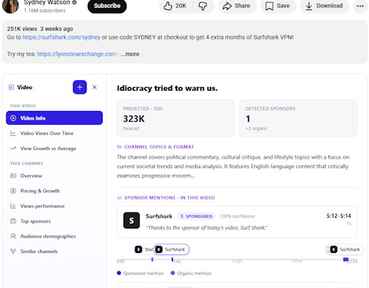
On YouTube
The panel opens beside the page you are already on: a watch page, a Short, a live stream, or a channel page.
It reads the channel in front of you, not a search box. Cards appear on video and channel pages — not on the browse feed, where there is no single channel to analyze.
- This video
- Projected views against the channel's own average, the sponsors detected in it, and where each read falls.
- Overview
- What the channel makes, how often, in what language, for which country.
- Pricing & growth
- What the channel costs and which way its numbers are moving.
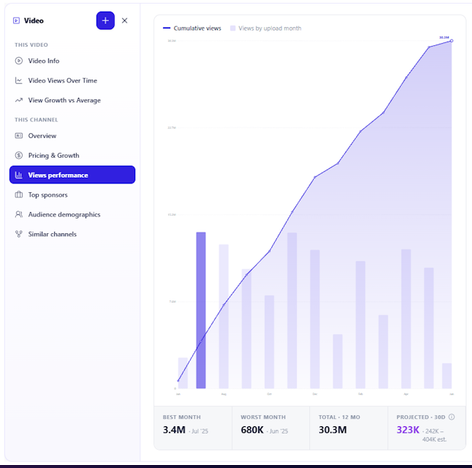
- Views performance
- The 12-month view curve, best and worst month, and a 30-day projection.
- Top sponsors
- The brands that have sponsored it most, and how recently. Paid plans.
- Audience demographics
- Where the audience is and how old it is. Paid plans.
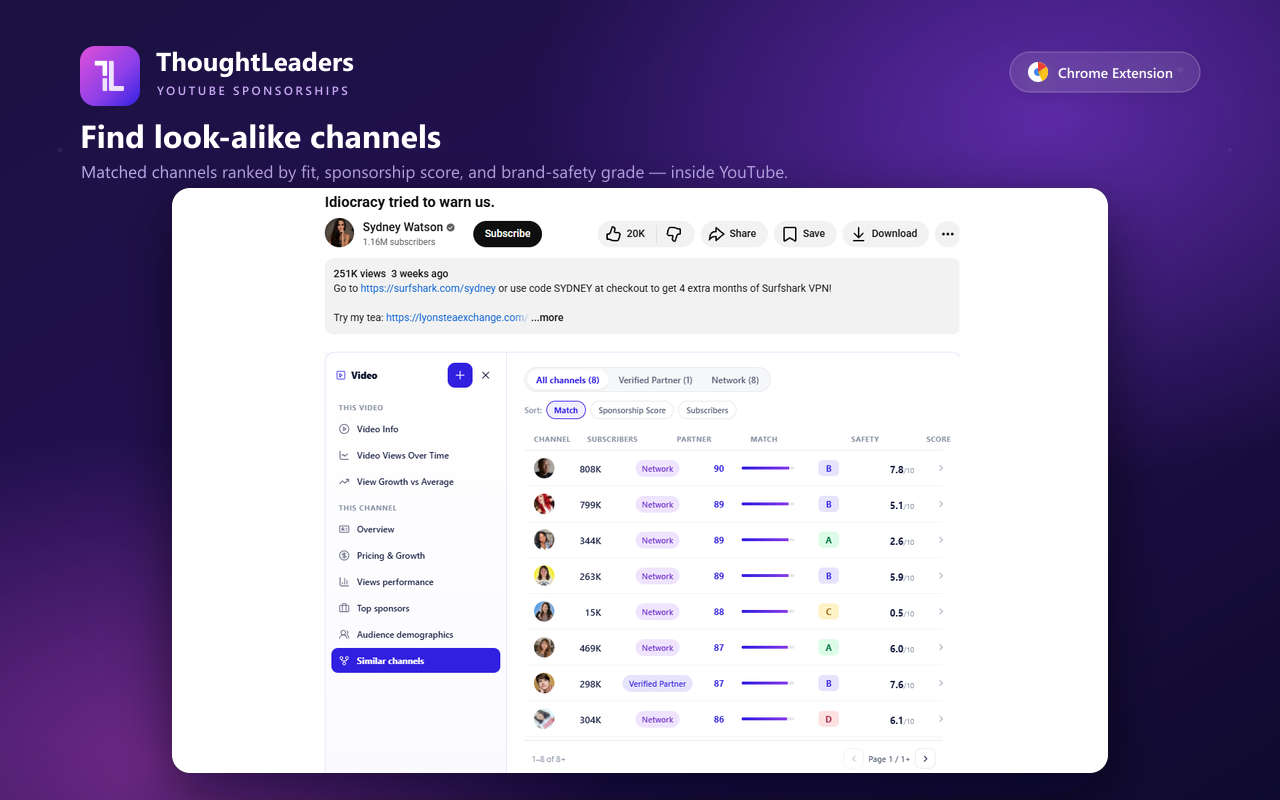
- Similar channels
- Ranked look-alikes with a match score, brand-safety grade and sponsorship score.
On every other social, it finds the YouTube channel
A creator's Instagram or TikTok profile is a name, not a dataset. The extension matches that profile to the creator's YouTube channel and shows you that channel's card.
- YouTube
- X
- TikTok
- Twitch
- Apple Podcasts
On the five non-YouTube platforms, what you get is the matched YouTube channel's card: its deal history, projected views, audience and pricing. We do not have native analytics for Instagram, X, TikTok, Twitch or Apple Podcasts, and the panel does not pretend otherwise.
That is still the answer most of the time. The question in front of you is usually "is this creator worth a conversation", and the YouTube record — 15.9M detected placements deep — is the part of a creator's business that is actually measurable.
Same account, same balance
The extension signs in with the account you use for the web app and your agent, and spends from the same balance.
Add a channel to a media plan
From the side panel, without leaving the video. Open the web app and it is there for the team.
Track is a request, not a watchlist
If we do not cover a channel yet, "Track" asks us to add it. It is a one-time coverage request — it does not create a list that syncs.
One balance
Every account gets a weekly allowance, and you spend it as you look at channels, from the same balance the web app and your agent draw on.
Nothing extra to operate
No second login, no second bill, no separate dataset to keep in sync.
Free to install
Every account gets a weekly allowance you spend as you look at channels; a team seat unlocks audience demographics, contact details and top sponsors.
Free on every account
- Installing it, and signing in with the account you already have.
- A weekly allowance on every account, spent as you look at channels.
- The same allowance across the web app and your agent, from one balance.
It gets better every time you use it
The panel is not the same on your fifth day as it was on your first. It learns what you are looking for, and it carries your team with it.
A two-minute preferences interview
The side panel offers it the first time you open a channel: which categories you want, which to avoid, which brands to block or dream about. The same profile serves the web app and your agent, so every suggestion is ranked against it.
Notes, badged where you browse
Your team leaves notes on channels and reports in the web app, and the extension badges the unread ones in Chrome, so you read them on the page they are about.
Proposals in one click
Turn the channel in front of you into a sponsorship proposal from the side panel, and track it in the pipeline with the rest of the team's deals.
Built on the same data your agent queries.
Every number in the side panel comes out of the same stores your agent queries directly: 1.3M tracked channels, 687M indexed videos, and 8.5B time-series snapshots behind the view curves.
The next channel you open comes with its receipts.
Free to install, with a weekly allowance on every account, and it uses the account you already have.