How to check a YouTube sponsorship quote with your AI assistant
A creator sent you a price (in our example, a hypothetical $5,000 quote on an example channel). Before you sign, ask your AI agent to check it against the channel's projected views and a fair-value estimate, see what is driving the number, and turn the gap into a counter-offer. Here is the exact workflow, step by step.
A creator’s manager sends a number. Your budget owner wants to know if it’s fair. Most teams answer with a gut call or last year’s spreadsheet. You can do better in about a minute: ask your AI agent to check the quote against what the channel actually delivers and what drives its value.
This post walks through the workflow with an example. The channel and every number in it are made up for illustration, so you can follow the math: a channel with 1.5M subscribers and a $5,000 quote. Run the same steps on a real channel and your agent pulls its live numbers.
What you need
- An AI agent that can run tools: Claude Code, Codex, Gemini CLI, OpenCode or Cursor.
- The ThoughtLeaders CLI connected to it. Setup takes a couple of minutes: see install.
- The quote: the price, the format (a dedicated video, an integrated mention, a Short) and any views guarantee.
Step 1: Ask the question the way you’d ask a colleague
You don’t need to know any commands. Type the question:
Say we were quoted $5,000 for one integrated mention on this channel. Is that fair? What should we counter with?
Your agent resolves the channel and pulls its numbers. Under the hood it starts with:
tl channels show "<channel name>"Step 2: Start from projected views, not the average
The first number to look at is what a new video on this channel is likely to reach. Our example channel has 1.5M subscribers, and say its projected views for a long-form video come back at 100,000.
That projection is deliberately conservative. ThoughtLeaders looks at the channel’s uploads from the last 30 to 90 days and reads each one’s views at day 30. Then it caps runaway hits at twice the median and drops the flops before averaging. A simple average of recent videos lies, because one viral upload drags it up. Day 30 doesn’t.
Formats are projected separately, so check the right one. A Short is projected on its own, and on a channel like this it might project around half the long-form number.
Step 3: Read the fair-value estimate as an appraisal
Say ThoughtLeaders’ estimate for one integration on this channel comes back at $3,000. Think of it like a home appraisal: a fair value for the placement, not the creator’s rate card and not the price you’ll end up paying.
What makes it useful is that you can see what moved it. Starting from projected views and a cost per view that fits a channel this size, an estimate like this one might move:
- Up for momentum. If the channel’s short-term view projections have trended upward over the last eight weeks, the estimate rewards it.
- Up for an active sponsor history. For example, if about 40% of its long-form videos in the last year carried a sponsor.
- Up for renewals. For example, if about a third of the brands that sponsored the channel in the last year came back for another booking at least 60 days later. Renewals are the strongest public evidence that sponsorships here work, because nobody renews a channel on vibes.
- Up slightly for evergreen views. Videos keep collecting views after their first month, which is upside you don’t pay for.
- Down for weak engagement. Few comments for the views puts a channel in an engagement band that lowers the estimate.
Step 4: Turn the quote into a cost per thousand views
Price on its own tells you little. Divide by the views you expect:
- The quote: $5,000 ÷ 100,000 views × 1,000 = $50.00 per thousand views
- The estimate: $3,000 ÷ 100,000 views × 1,000 = $30.00 per thousand views
The quote is about 67% above the estimate. The CPM calculator does this division for you and shows the market median for the channel’s size next to it. That doesn’t make it a bad deal. It means you need a reason to pay the premium, or a counter.
A note on YouTube’s view-count change
On August 24, 2026, YouTube changed how public views are counted: a view now counts from the first frame. The old public number is what YouTube Studio now calls engaged views. Our measurement shows long-form public counts running about 1.2 to 1.5 times the old basis in a video’s first week, most in the first days and on smaller channels. Shorts didn’t change. For what changed and how to compare on the same basis, see YouTube’s new view count and your sponsorship math.
Two things follow for a quote check:
- Compare on the same basis. A cost per thousand views worked out on today’s public counts looks cheaper than the same audience did last summer. Compare day-30 views to day-30 views, counted the same way.
- Write guarantees in engaged views. If you agree to a views guarantee, count it in engaged views from the creator’s YouTube Studio at a fixed age, such as day 30, not the public counter.
Step 5: Ask for the counter-offer memo
Follow up in the same conversation:
Write me a short counter-offer memo. Use the projected views, the estimate and what drives it, and suggest a views guarantee instead of a flat discount.
A good memo from your agent does three things:
- States the gap in views, not opinions. “At 100K projected views, $5,000 is $50 per thousand views, against an estimate of $30.”
- Offers a counter, plus protection. Counter with a price near the estimate. If you agree to pay more, ask for a views guarantee as downside protection: if the video comes in under an agreed number of engaged views by day 30, the creator makes it up with a bonus mention or a partial refund. The make-good terms are part of the negotiation. A guarantee near the projection protects you from a flop; it doesn’t make $5,000 cheaper. In this example, $5,000 would only match the estimate’s cost per thousand views at about 167,000 views, far above what the channel projects, so don’t treat a guarantee as a substitute for a lower price.
- Names what could justify the premium. The channel’s momentum and repeat sponsors are real strengths. A launch-week slot, usage rights for paid ads, or an audience that converts unusually well for your product can also be worth paying for.
To size a guarantee, ask the creator for engaged views at day 30 on their recent videos from YouTube Studio, and set the number from those. The views guarantee skill resamples the channel’s recent day-30 public views; use it as a guide to how consistent the channel is, but keep the public and engaged counts separate, since they no longer match for new long-form videos.
Step 6: Check the channel where you’ll actually see it
Before you sign, open the channel on YouTube with the ThoughtLeaders Chrome extension installed. The same kinds of numbers appear right under the video: projected views, the sponsors detected in each video, pricing and growth, and twelve months of performance. You can see whether recent videos are trending up or down before you commit.
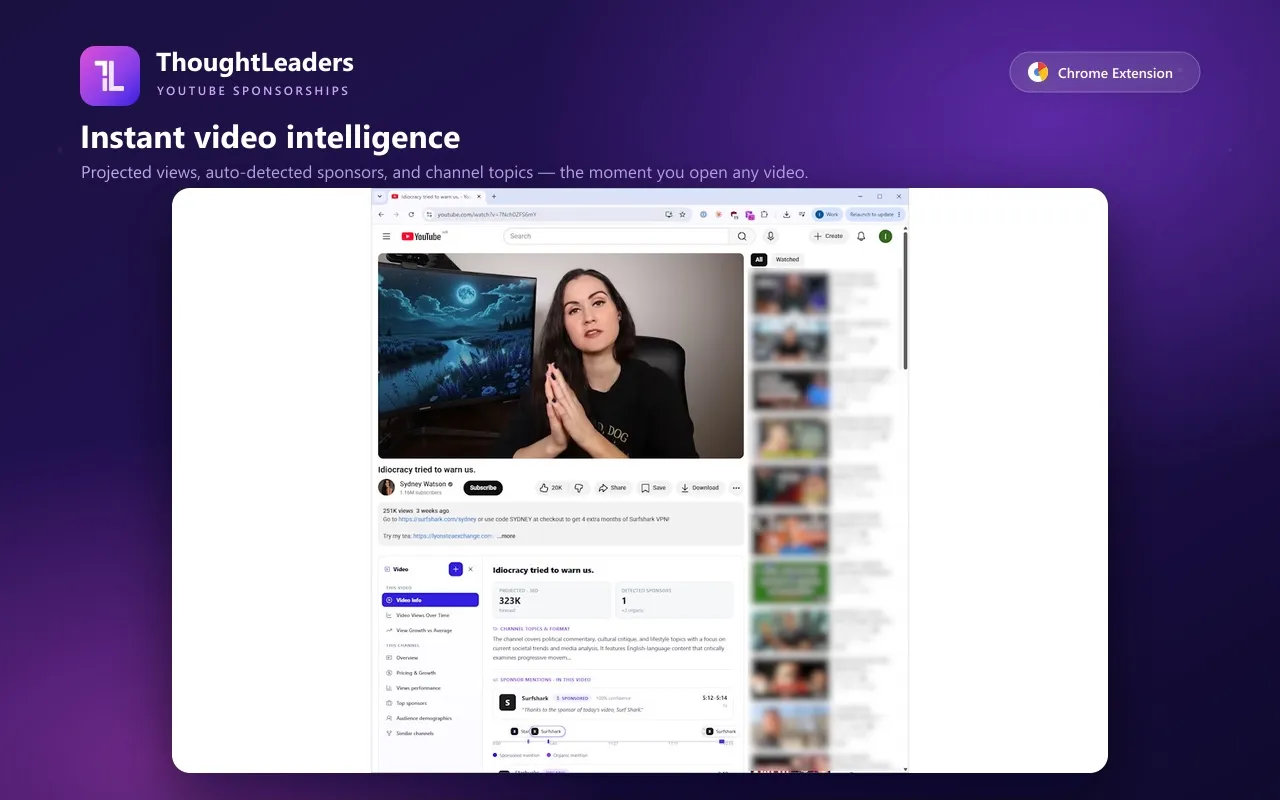
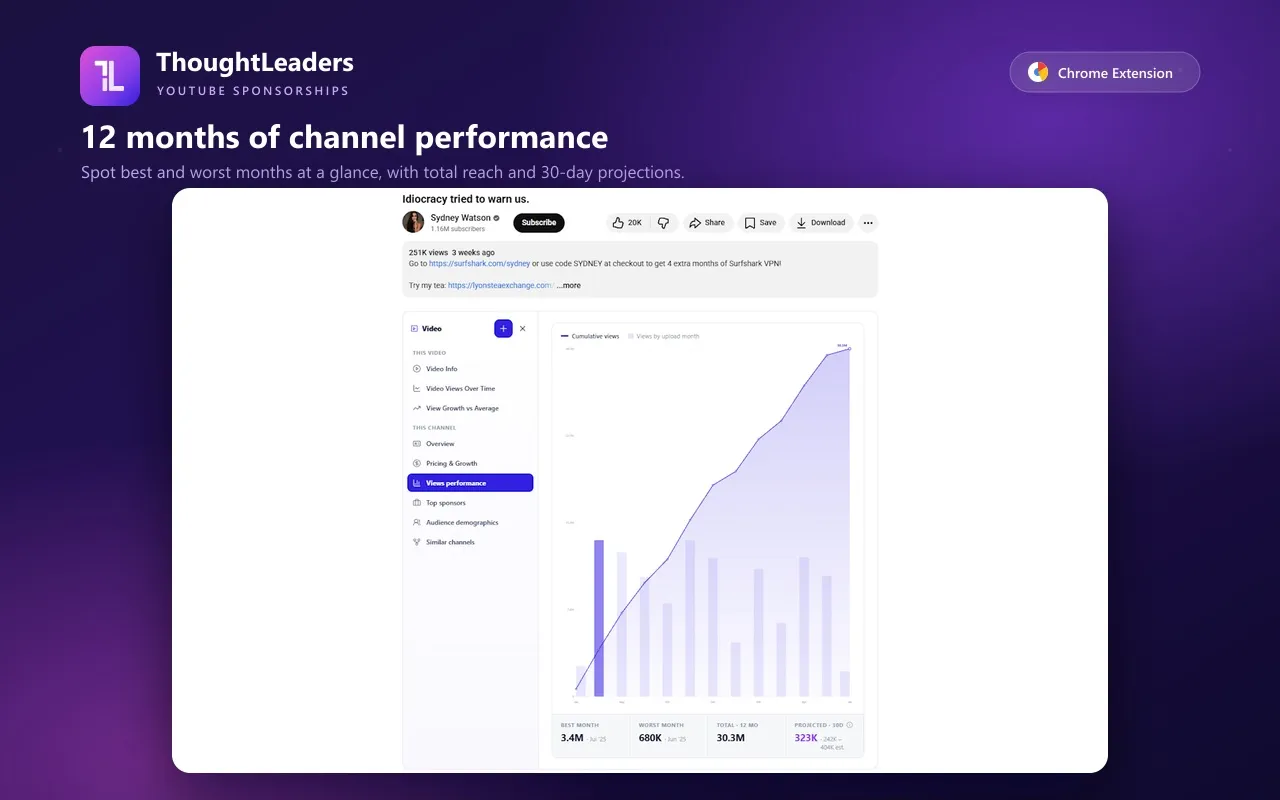
The screenshots show the extension on a different channel, to illustrate the panels. Open the channel you were quoted on to see its numbers.
What this check can’t tell you
- The estimate is a starting point. Creators set their own prices, and demand for a channel can run ahead of its numbers.
- Your results may differ from the channel average. The best predictor of how a channel will work for you is how it worked for brands like yours. Look at who renewed.
- Numbers move. A channel’s projection changes as it publishes, so re-run the check on the day you negotiate.
Try it on your next quote
The fastest way to see whether this is useful is to run it on a quote you already have. Install the CLI and ask your agent the question in Step 1, or add the Chrome extension and open the channel on YouTube.